Thursday, November 10, 2011

Using recursion to do permutations

Solving problems using recursion.
 I have always had problems in understanding deep and complex recusion eventhough they all follow a common pattern that  is There is always a base case to stop the recursion and making a recursive call on some smaller part of the solution, I decided to set my bar high . Here are the things i set to use recursion to understand complex recursive calls .

  1. Solving Sudoku using Backtracking
  2. The Chess  Knight - Queen classic
  3. Permutations
  4. More problems as I come across.

Let start with the case that allows you to select all possible combinations of all members a set. I learnt that this recursive pattern in very important to understand because the is a common pattern used in solving the problems that I mentioned above and many others like searching and solving word puzzles
  Permutation
  I define  permutations as all the ways to arrange a set of items for example if you permute the word {cat} you get {cat, tac, act, atc, tca, cta}. Permutations are mathematical and if you want a deeper understanding of this then go to Permutation. in Wikepidia and read more
In the program below  the program does  permutation recursively . I am writing this because I feel I have started getting the power of recursion and how to solve problems with them. The truth is i understood the classical recursive  examples in the university like  Fibonacci ,factorials and the towers of Hanoi  but when it came to complex recursive example like the one below. I got a headache in thinking recursively.
 Here are the tough questions to answer when writing a program that does permutations.

  1. How do you just pick one element on the set and know which one to attach next? 
  2. How do you avoid doubles and repeating each elements?
  3. How do you separate them? 
  4. How do you know that all the possible combinations of the set have been made?
Here is the program written in C# that does permutations .


class Program
    {
        static void Main(string[] args)
        {
            Permutate("ABCD");
        }
        public static void RecPermute(string permutateHolder , string itemToPermutate)
        {
            if (itemToPermutate== string.Empty)
            {
                Console.WriteLine(permutateHolder);
            }
            else
            {
                for (int i = 0; i < itemToPermutate.Length; i++)
                {   // Get the rest of the items remaining in the set
                    var remaining = itemToPermutate.Substring(0, i) + itemToPermutate.Substring(i+1);
               //Take each element from the item and do a recursive call on them
                    RecPermute(permutateHolder + itemToPermutate[i], remaining);                    
                }
            }
        }

        // Wrapper for permutate function
        public static void Permutate(string item)
        {
            RecPermute("", item);
        }
    }
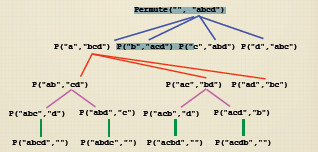
Here is part of the recursive tree of the program Permutate("ABCD").It show permutations for all elements beginning with the letter A.The other elements of the set follow the same pattern.
Happy programming !

Wednesday, November 9, 2011

Using design patterns to build part of a soccer game engine

My goal here is to see if  I can use and understand design patterns and use them to solve a real world problem. I started by first learning the singleton pattern  and used it in my Dynamic quiz application using ASP.net MVC and Entity Framework Code First. I want to design a soccer game engine .Its a big a complex problem to solve but the best way to solve such a problem is to divide it into smaller parts that contains all components of building a soccer game engine. For this post I will focus on the problem of letting the referees  and players know the current position of the ball always .I play soccer and love soccer so lets get real now to see what will be needed for this
  • A soccer game must have a ball
  • They are 11 players in each team
  • There are two teams
  • Two  lines men and one referee
  • Each team has reserve players
  • There is the playground of course
The ball is the center of attention and  everybody of interest for that game wants to know where the ball is and whats happening to it . Who  are the watchers  of the ball ?
Here is where the first problem comes in .
How do I solve the problem where the referees and players know the current position and get updates of  the ball position  as its played on the field.
Lets define some  real objects needed to solve the problem
  1. Ball
  2. Players
  3. Playground
  4. Referee
  5. Team
Now that we have  some real soccer objects you will find on every soccer game. We need to  create some logical objects (objects that connect the real world objects and use  programming logical controls and give them  some life)


 The Game object defines a football game by  putting all components needed for a soccer game together like the players , ball etc...
The SoccerGame object will simply simulate  a football game.


Here is an abstract view of the system as I have described above.


Using design patterns is not the first thing you think when you  want to solve a problem but  they provide good software design principles that have stood the test of time thanks to the "Gang of Four"(GOF). Any way you can read more about this here design patterns. Since I want to know how to actually use them the best way is to try to use them in real world scenario.

I am a visual person so the best way  to see the problem is to get a visual of the problem .Here  is the way i see it below
The pattern that fits this is the Observer pattern which says that "Define a one-to-many dependency between objects so that when one object changes state, all its dependents are notified and updated automatically." In our case  all objects are dependent on the ball for a  soccer game and  the players, referees  must be notified and updated  as it changes state(moving).
The observer pattern in its raw state is shown below


The next step is to put the soccer problem in the context of the  observer pattern  and  this time there is  a position  object in three dimensions(x,y,z)  to connect to the change of the ball state since it describes  the current position on the play ground. Changes of the state of the ball is reflected by the position .It is the state that every observer has be notified and interested  about.


The subject is the soccer ball
The concrete object is the actual football that will be kicked
The observers are the players and referees and they  implement the IObserver interface.


The ball must have a list of observers
The observers have a pointer to the football object
The positions of  all the participants with the ball in the game has to be known.


Now how do we implement this in  C# ? Here is where I have to shut my mouth and get a prototype of the game engine for my customer.


Here is the code of the Game Engine only .It brings everything together

using System;
using System.Collections.Generic;
using System.Linq;
using System.Text;

namespace SoccerGame
{  
    /// 
    /// Simulating  part of a soccer game using the Observer pattern
    /// 
    public class GameEngine
    {

        public static void Main()
        {
            // Create our ball (the ConcreteSubject)
            var ball = new FootBall();

            // Create few players ( some ConcreteObservers)
            var messi = new Player(ball, "Messi");
            var etofils = new Player(ball, "Etofils");
            var Ibrahimmovic = new Player(ball, "Ibrahimovic");

            // Create some referees (also ConcreteObservers)
            var collina = new Referee(ball, "Collina");
            var ngala = new Referee(ball, "Ngala");

            Console.WriteLine();

            // Attach them with the ball
            ball.AttachObserver(messi);
            ball.AttachObserver(etofils);
            ball.AttachObserver(Ibrahimmovic);
            ball.AttachObserver(collina);
            ball.AttachObserver(ngala);
            Console.WriteLine(" After attaching the observers...");

            // Update the position of the ball. 
            // At this point, all the observers should be notified
            ball.SetBallPosition(new Position());
            Console.WriteLine();


            // Remove some observers
            ball.DetachObserver(etofils);
            ball.DetachObserver(collina);
            Console.WriteLine(" After detaching the refree Collina and Etofils from the ball...");


            // Updating the position of ball again
            // At this point, all the observers should be notified
            ball.SetBallPosition(new Position(10, 10, 30));
            // Press any key to continue....more things happen
            Console.Read();
        }
    }
}
That is it for now and happy programming !

Sunday, November 6, 2011

Building a dynamic quiz application in ASP.net MVC

The quiz application I have build works just like that of W3Schools I got the inspiration from here and I wanted to understand more on asp.net MVC scafolding and Entity framework Code first. I set on my journey to write the application. Here is how it should work.
  • The user goes to the quiz page to take the quiz
  • The quiz has a question and a list of answers choices to choose from.
  • When the user clicks on the next button , a new question is loaded dynamically.
  • When the questions are completed the user is sent to a page showing his or her results.

Some ASP.Net MVC stuff

I used code first method by making poco classes and scaffolded all my controllers and i got all my CRUD methods an views for the controllers I choosed. Asp.net MVC Entity framework now the default database object relational mapper for the framework.To know more about Code first and the new scaffolding in Asp.net MVC check out this link.Scaffolding and Entity framework code first The next thing for me was to decide of what real life objects can be used and how they are connected.In this case
  • I will need a to represent the question, the answer, and the answer choices.
  • I needed one object to bring all these other object together and that is the Quiz object .
  • I needed another object to manage the quiz since I decided to store the users answers in the memory.
Here are the classes and the ASP.net MVC will build the database using EF code first based on certain conventions you have to follow for it to be right .(Check out the tutorial link above)
To manage the quiz I use the Singleton pattern .The is only one quiz in the memory when you start until you finish. The quiz manager manages all events related to the quiz in the memory .I did not want to use the session object because wanted an optimal and a modular solution for the manager. Here is the code
using System;
using System.Collections.Generic;
using System.Linq;
using System.Web;
using MyQuiz.Abstract;

namespace MyQuiz.Models
{
    public class QuizManager
    {
        static QuizManager instance;
        private QuizContext db = new QuizContext();
        int questionId = 1;
        public bool IsComplete = false;
        public Quiz quiz;

        private QuizManager()
        {            
            quiz = new Quiz();
            quiz.StartTime = DateTime.Now;
            quiz.QuizId = 1;
            quiz.Score = 0 ;
        }

        public static QuizManager Instance
        {
            get
            {
                if (instance == null)
                    instance = new QuizManager();
                return instance;
            }
        }

        public Question LoadQuiz()
        {
            var question = db.Questions.Find(questionId);
            return question;
        }

        public void SaveAnswer(string answers)
        {
            var question = db.Questions.Include("Answers").Where(x => x.QuestionId == questionId).Single();
            if (question.Answers.AnswerText == answers)
             quiz.Score++;
        }

        public bool MoveToNextQuestion()
        {
            bool canMove = false;

            if ( db.Questions.Count() > questionId)
            {
                questionId++;
                canMove = true;
            }

            return canMove;
        }

        public bool PreviosQuestion()
        {
            bool canMove = false;

            if (questionId > 1)
            {
                questionId--;
                canMove = true;
            }

            return canMove;
        }     
    }
}

The home controller that sends the quiz to the view was implemented this way
using System;
using System.Collections.Generic;
using System.Linq;
using System.Web;
using System.Web.Mvc;
using MyQuiz.Models;

namespace MyQuiz.Controllers
{
    public class HomeController : Controller
    {   

        public ActionResult Index()
        {   
            var question = QuizManager.Instance.LoadQuiz();
            return View(question);
        }
        [HttpPost]
        public ActionResult Index(string answer, int questionId)
        {   
            if(QuizManager.Instance.IsComplete) // Prevent score increase when quix has been completed
             return RedirectToAction("ShowResults");     
          
            QuizManager.Instance.SaveAnswer(answer);
            if (QuizManager.Instance.MoveToNextQuestion())
            {
                var question = QuizManager.Instance.LoadQuiz();
                return View(question);
            }
            QuizManager.Instance.IsComplete = true;
            return RedirectToAction("ShowResults");  
        }
        public ActionResult About()
        {
            return View();
        }
        public ActionResult ShowResults()
        {
            return View(QuizManager.Instance.quiz);
        }
    }
}

The View of the quiz . I use the JQuery live(---) function that allows for asynchronous loading and event handling on the page . After getting the response from the controller I simply replace the quiz div area with new questions using the replaceWith(---) function in JQuery. The process continuous until the user answers the last question .
@model MyQuiz.Models.Question
@{
    ViewBag.Title = "Index";
}

@using (Html.BeginForm("Index", "Home")) {

@Model.QuestionText

@Html.HiddenFor(x => x.QuestionId)

  • @foreach (var choice in Model.AnswerChoices) {
      @Html.RadioButton("answer", @choice.Choices) @choice.Choices
    }
  • }

    The result page just displays the results of the quiz .Here is the source
    @model MyQuiz.Models.Quiz
    
    @{
        ViewBag.Title = "ShowResults";
    }


    ShowResults

    Your total score is @Model.Score

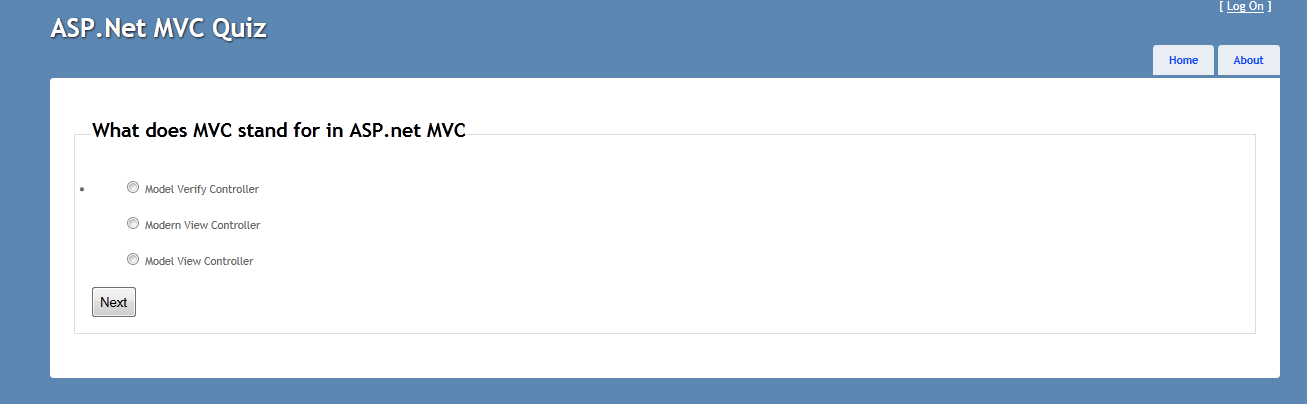
    Here is a screen shot of the final application

    • There is more to add like scaffolding repositories.
    • Use Dependency injection to reduce coupling of objects

    Here is the source code if want to play with it. I moved the source code to Github since some readers could not access the source code on google drive. I took advantage to play with the new Github for windows which I find intresting since i have always used Apache Subversion, svn.
    I have made some improvement on the code like moving it to MVC4  and  you can see the final application running here  MVC Quiz Application on  AppHarbor (I love these guys)
    Happy programming !

    Sunday, January 9, 2011

    Accessing variables on and from masterpages, pages and usercontrols in asp.net

    I was working on a project and had to perform certain actions like

    -Access variables and functions on another page from an event generated from the MasterPage .
    -Accessing variables on another page from a userControl .
    -Accessing variables on the MasterPage .

    The challenge i had here was that i had never done all these before .I have read a couple of books, blog , read source code from open source applications but never seen a situation like that .Then i asked myself the question.
    Why would one want to carry out any of the procedures i stated above ?
    I had to guess that they are some reasons to do this is ----
    -It means that the design of the program was wrong from the beginning .
    -You are forced to use it to fulfill a certain condition .
    -It is the last choice you got.
    Anyway i solved the problems by carrying out the above three procedures and i think it might help someone out there .Here is how i did it

    Access variables and functions on another page from an event generated from the MasterPage
    Create a function to generate the event on the MasterPage and expose the variable to access using properties {get;set}
    Write no code on the event .You might want to if you need it.
    protected void CheckOut_Click(object sender, EventArgs e)
        {
             
        }
    

    Create a reference to the MasterPage from the child page
    <%@ MasterType VirtualPath="~/MyMasterPage.master" %>


    Add and Init-Event on the secondary page .On that Init_Page event get the reference to the MasterPage and generate an event handler delegate that will point to a function in the secondary page .
    protected void Page_Init(object sender, EventArgs e)
    {
            Master.CheckOutBut.Click += new EventHandler(bnDoSomethingIn_Click);
    
    }
    

    Function to call on the child page
    protected void bnDoSomethingIn_Click(object sender, EventArgs e)
     {
            Master.CheckOutBut.Click += new EventHandler(bnDoSomethingIn_Click);
    
     }
    

    -Accessing variables on another page from a userControl .
    Create an abstract class and let it inherit from the page class and some abstract methods that are signatures to the methods you have to override on the child page
    public abstract class AbstractPage:System.Web.UI.Page
    {
     public AbstractPage()
     {
      //
      // TODO: Add constructor logic here
      //
     }
    // some methods
        public abstract void DoSomething();
         public abstract void MyMethodTwo();
    
    }
    
    Let the page inherit from abstractPage class you created
    public partial class MyPage : AbstractPage
    {
        public void override DoSomething()
         {  
             ----
             ------
         }
    }
    

    Access a function on the host(.aspx) page from the UserControl
    private void SomeFunction()
        {
            AbstractPage MyPage = (AbstractPage)Page; // reference to  hostPage
            MyPage.DoSomething();
        }


    -Accessing variables on the MasterPage .
    Expose the variables on the MasterPage
    public LinkButton CheckOutBut
        {
            get { return checkOutBut; }
        }
    
        public Label NameLabel
        {
            get { return lblName; }
        }
    

    Create a reference to the MasterPage from the child page
    // Add this on the top of the child Page(.aspx) under the page definitions
    <%@ MasterType VirtualPath="~/MyMasterPage.master" %>
    
    //from the userControl you can access the MasterPage variables using
     MyMasterPage mp = (MyMasterPage)Page.Master;
     mp.CheckOutBut
    
    //from the childPage you can access the MasterPage variables using
     Master.NameLabel.Text = "Something" ;
    

    Happy Programming .

    Wednesday, December 22, 2010

    Making a multi-choice quiz application in Asp.net

    I was very interested the quiz that is in w3schools I decided to try to create one in Asp.net.I use a database and Viewstates to manage the quiz .It is very staigtht forward and self explainatory .If you are interested, I can always explain it .


    Here is the final view
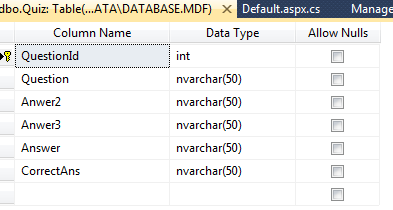
    Database
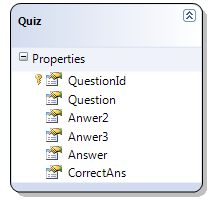
    I use Linq to SQL classes
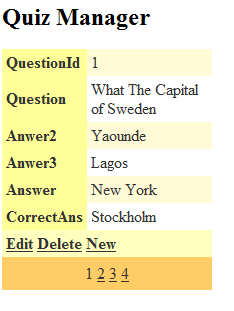
    Finally i create simple Quiz manager to insert,update and delete questions for the quiz.I use a detailsview control because its very optimal for such funtionality


    Here is the source code for the quiz i made.
    using System;
     using System;
    using System.Collections.Generic;
    using System.Linq;
    using System.Web;
    using System.Web.UI;
    using System.Web.UI.WebControls;
    using System.Collections;
    
    public partial class _Default : System.Web.UI.Page
    { 
       //create variables you will need to use in the application
        ArrayList quizHistory = new ArrayList();
        QuizDataContext qz = new QuizDataContext();
        int questionNum = 1;
        int score = 0;
        int totalQuestions;
        Random generator;
    
        protected void Page_Load(object sender, EventArgs e)
        {
            // Load quiz on page load
            if (!Page.IsPostBack) 
            {
                totalQuestions = qz.Quizs.Count();
                LoadQuestion(questionNum);
            }
        }
    
        void LoadQuestion(int questionNum)
        {
            Quiz myQuiz;
            generator = new Random();
            int ranHolder;
            using (QuizDataContext db = new QuizDataContext())
            {
                myQuiz = (from q in db.Quizs
                          where q.QuestionId == questionNum
                          select q).Single(); // only single instance wanted
    
                // clear Previos items
                answers.Items.Clear();
    
                //allocate values to controls
                Label1.Text = myQuiz.Question;
                //random template loader
                ranHolder = generator.Next(1, 4); // Quiz template position is random.
                switch (ranHolder)
                {
                    case 1: // template One
                        answers.Items.Add(myQuiz.Answer);
                        answers.Items.Add(myQuiz.Anwer2);
                        answers.Items.Add(myQuiz.CorrectAns);
                        answers.Items.Add(myQuiz.Anwer3);
                        // store key items into the ViewState bag
                        SaveAnswers(myQuiz);
                        break;
                    case 2:
                        answers.Items.Add(myQuiz.Answer);
                        answers.Items.Add(myQuiz.CorrectAns);
                        answers.Items.Add(myQuiz.Anwer2);
                        answers.Items.Add(myQuiz.Anwer3);
                        // store key items into the ViewState bag
                        SaveAnswers(myQuiz);
                        break;
                    case 3:
                        answers.Items.Add(myQuiz.Answer);
                        answers.Items.Add(myQuiz.Anwer2);
                        answers.Items.Add(myQuiz.Anwer3);
                        answers.Items.Add(myQuiz.CorrectAns);
    
                        // store key items into the ViewState bag
                        SaveAnswers(myQuiz);
                        break;
                    case 4:
                        answers.Items.Add(myQuiz.CorrectAns);
                        answers.Items.Add(myQuiz.Answer);
                        answers.Items.Add(myQuiz.Anwer2);
                        answers.Items.Add(myQuiz.Anwer3);
    
                        // store key items into the ViewState bag
                        SaveAnswers(myQuiz);
                        break;
                }
    
            }
    
        }
    
        private void SaveAnswers(Quiz myQuiz)
        {    // save to viewstate
            ViewState["CorrectAnswer"] = myQuiz.CorrectAns;
            ViewState["History"] = quizHistory;
            ViewState["QuestionNum"] = myQuiz.QuestionId;
            ViewState["Scores"] = score;
            ViewState["QuestionTotal"] = totalQuestions;
        }
        protected void nextBtn_Click(object sender, EventArgs e)
        {
            // store essental variables in the viewState bag
            quizHistory = (ArrayList)ViewState["History"];
            questionNum = (int)ViewState["QuestionNum"];
            score = (int)ViewState["Scores"];
            totalQuestions = (int)ViewState["QuestionTotal"];
    
    
            // check for correct answer
            if (answers.SelectedItem.Value == (string)ViewState["CorrectAnswer"])
            {
                score += 1;
                quizHistory.Add("Correct");
            }
            else
            {
                // add to history
                quizHistory.Add(answers.SelectedItem.Value);
            }
    
            // Check if end of Quiz
            //if end show results
            if (totalQuestions == questionNum)
            {
                ResultPanel.Visible = true;
                ShowResult();
            }
            else
            {    //Hide result panel
                ResultPanel.Visible = false;
                //Go to next question            
                questionNum += 1;
                // show next question
                LoadQuestion(questionNum);
            }
        }
        void ShowResult()
        {
    
            Label2.Text = "Score " + score.ToString() + " / 4 ";
            LblCongrats.Text = "

    Congratulations!!!

    "; if (score == qz.Quizs.Count()) LblCongrats.Visible = true; for (int i = 1; i <= totalQuestions; i++) { lblHistory.Text += i.ToString() + " Choice made was " + quizHistory[i - 1] + " "; } } protected void LoadBut_Click(object sender, EventArgs e) { totalQuestions = qz.Quizs.Count(); LoadQuestion(questionNum); Response.Redirect("Default.aspx"); } }
    Happy programming
    In my next post i will write the same application using ASP.net MVC ."The only way to learn a framework is to build an application with it".

    Tuesday, December 21, 2010

    Loose Design with Interfaces

    I am very interested in design patterns but i have not really had it easy trying to understand how they work .Anyway i think i am getting better in understanding them. I read this wonderful post from this blog Software-design-patterns-for-everyone It helped me understand some patterns better . The truth is that practice makes perfect ."I have to write my own game engine using patterns to learn patterns".Very possible as everything else is, if the goals are realistic to attend .

    I am currently reading been reading Professional ASP.NET MVC 2: NerdDinner and in the book there is use of a couple of patterns like repository patterns ,dependency control and others (still reading ) .The was one aspect that caught me and i think it was very interesting It was about loose design with interfaces that can make test driven development(TDD)easy .Objects are not to be passed as parameters just what they do is passed as parameters .After understanding it i decided to try to implement it by building a small home simulator .The program simple simulates a home .I am still learning but to learn something you have to start by learning something somewhere in some way you can understand .

    I could have just created a home object and other homes can inherited from it.
    What if i want simulate a hotel someday ?
    Do i have to start everything adding a bigger home and doing changes in the code in many places .?
    All i want is a simulator for a home .The object can simulate home activities .This object can simulate any home .
    Call it and tell it how you want the home to be simulated.
    Lets simulate a home using interfaces .


    namespace LearningInterfaces
    {
         public interface ISimulateHomeActivities   // main interface
        {
            void CookFood(string foodType);
            void Sleep(string time);
            void DoLaundry();      
        }
    
    }
    

    This class uses the interface to simulate the home .
    namespace LearningInterfaces
    {
         public class HomeActivities // main simulator manager
        {
             public void DoActivity(ISimulateHomeActivities activity, string foodType , string sleepTime);
             {
                 activity.DoLaundry();
                 activity.CookFood(foodType);
                 activity.Sleep(sleepTime);
             }
        }
    }
    

    Its time to get homes that want to be simulated
    The Talla's home is the first on the list .It implements the ISimulateHomeactivities

    namespace LearningInterfaces
    {
         public class TallasHome:ISimulateHomeActivities
        {
            #region ISimulateHomeActivities Members
    
            public void CookFood(string foodType)
            {
                Console.WriteLine("We are going to cook " + foodType + " today");
            }
    
            public void Sleep(string time)
            {
                Console.WriteLine("We  usually sleep at  " + time);
            }
    
            public void DoLaundry()
            {
                Console.WriteLine("We  are doing laundry ");
            }
            #endregion
        }
    }


    Peter loved my home simulator and wants his home to be simulated
    namespace LearningInterfaces
    {
        public  class PetersHome:ISimulateHomeActivities
        {
    
            #region ISimulateHomeActivities Members
    
            public void CookFood(string foodType)
            {
                Console.WriteLine("We are going to cook " + foodType + " today");
            }
    
            public void Sleep(string time)
            {
                Console.WriteLine("We  usually sleep at  "+ time);
            }
    
            public void DoLaundry()
            {
                Console.WriteLine("We  are doing laundry ");
            }
    
            #endregion
        }
    }
    
    Finally lets get the simulation running

    using System;
    using System.Collections.Generic;
    using System.Linq;
    using System
    namespace m.Text;
    LearningInterfaces
    {
        class Program
        {
            static void Main(string[] args)
            {    var tallasHome = new TallasHome();
                 var petersHome = new PetersHome();
                 var activities = new HomeActivities();
                 activities.DoActivity(tallasHome, "Rice and Chicken", "10 pm");
                 Console.WriteLine("----------------------------------------------");
                 activities.DoActivity(petersHome, "Pasta with Fish", "11:30 pm");
    
            }
        }
    }


    The simulator running prints out the following------simulating Talla,s and Peter's home

    We are doing laundry
    We are going to cook Rice and Chicken today
    We usually sleep at 10 pm
    ----------------------------------------------
    We are doing laundry
    We are going to cook Pasta with Fish today
    We usually sleep at 11:30 pm
    Press any key to continue . . .

    Happy programming ............................

    Saturday, December 4, 2010

    Why I should learn ASP.Net MVC .

    There has been lot of talk on the internet about Asp.net web form and the new Asp.net framework MVC .I have read a couple of them and watched to a couple of videos that was done by the creators themselves who all work at Microsoft.I have watched Scott Hanselaman's videos on making of the Nerd-dinner portal and even downloaded the book and source code to play with it.

    After reading all these blogs and various views about the two frameworks and reading the book Professional ASP.NET MVC 2 about the creation of the Nerd-dinner portal i came to the following conclusion
    MVC is just an amazing framework that is good to use if you want control in your application.
    It is very easy to turn my applications to be mobile phone adapted and it you can keep on expanding it the way you want and great of all it is easy to do test in MVC.

    There is a clear separation of concerns MVC(Models,Views and Controllers)

    Nice SEO urls.that are search engine friendly.

    There is more work to be done when developing in MVC and the final HTML code is clear and understandable since there is no viewstate and postbacks .

    So why should i learn ASP.net MVC ?
    I think it will make me a better web developer .I did not know anything about this pattern but after some hard work I now understand it .
    I also learned more about the repository pattern and even building a web application using real code and no controls that one can drag and drop .
    I learned more about routing URLs and real jquesry and Ajax with no script managers or update panels added into the application .
    I should learn MVC to be a complete ASP.net developer who can work and build applications in both frameworks.
    There is more real coding and no drag and drops hence the geekiners in me feels good about that.

    Finally the choice between ASP.net MVC and ASP.net web form boils down to the kind of project you are doing ,how fast you want to ship it, the number of developers you have and the environment of usage .
    If you are intrested about MVC then here is where to go Learn ASP.net MVC

    Machine learning is the future

    I am very enthusiastic about machine learning and the potential it has solve tough problems. Considering the fact that the amount of data we...